

Let’s break down exactly how to use each one to automate your business in 2026.
A recent Forbes report shows 67% of small businesses now use AI tools for automation to save time and cut costs.
Why AI is Non-Negotiable for Small Business in 2026
According to reports from SMBTech and Gartner, the majority of small businesses now consider AI tools essential for staying competitive. The top 3 pain points AI solves are customer DMs, content creation, and manual data entry between apps. Fast reply times and 24/7 availability are now baseline customer expectations.
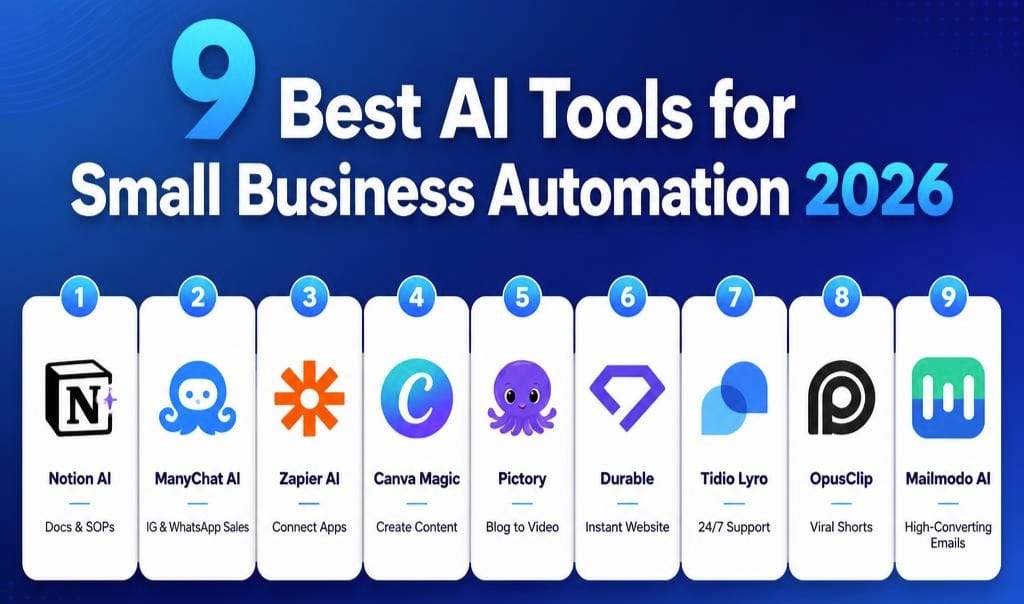
9 Best AI Tools for Small Business Automation 2026
Here is the exact stack recommended for U.S. small businesses in 2026. These 9 tools are consistently ranked highest for ROI, ease of use, and customer support.
1. Notion AI – Your AI Chief of Staff – $10/month
What It Does: Turns messy notes, client calls, and ideas into SOPs, project plans, proposals, and summaries. It lives inside your Notion workspace.
Best Use for SMBs: Document processes once and let AI update them. Create client proposals in minutes using past data.
Why It’s Key for 2026: The new “AI Meetings” feature joins your Zoom calls, takes notes, and assigns tasks automatically.
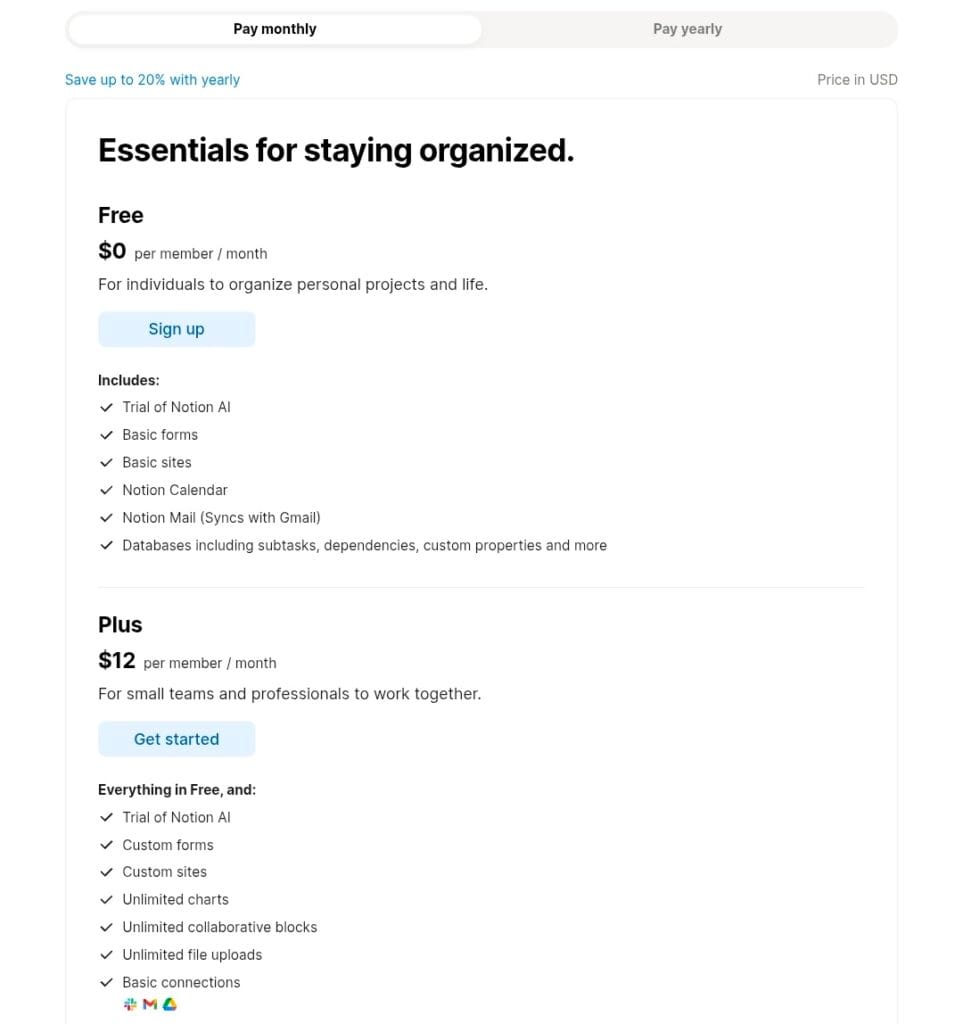
Pricing: Notion is free. Notion AI add-on is $10 per month billed annually or $12 per month billed monthly.
Website: notion.so
2. ManyChat AI – Your 24/7 DM Sales Rep – Free to $39/month
What It Does: Auto-replies to Instagram DMs, Facebook comments, and WhatsApp with GPT-4o. It can answer FAQs, qualify leads, and take orders inside the chat.
Best Use for SMBs: Handle “How much?” messages at 2 AM. The bot can reply, send a coupon, and capture emails instantly.
Why It’s Key for 2026: The “AI Step” can now handle sales objections like “too expensive” with payment plans or value breakdowns.
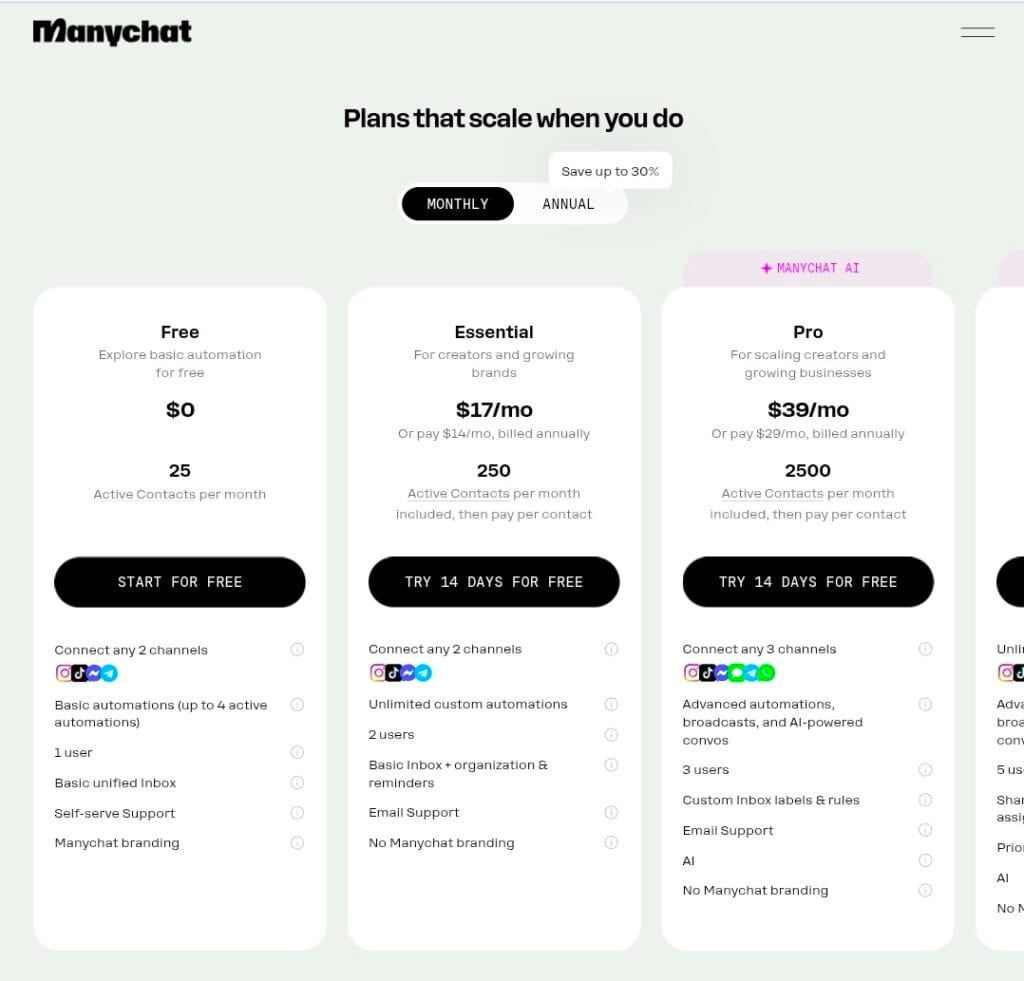
Pricing: ManyChat has a Free plan with 25 active contacts per month. The Essential plan is $17 per month billed monthly, or $14 per month billed annually, and includes 250 contacts. The Pro plan is $39 per month billed monthly, or $29 per month billed annually, with 2,500 contacts included. All plans support 2+ channels like Instagram and WhatsApp.
Website: manychat.com
3. Zapier AI – The Glue for Your Entire Business – $19.99/month
What It Does: Connects 6,000+ apps. Example: When you get a Shopify order, add it to Google Sheets, notify Slack, and create a ShipStation label automatically.
Best Use for SMBs: Eliminates copy-paste work between apps. This is where most small businesses lose significant time per week.
Why It’s Key for 2026: “Zapier Central” lets you type in plain English: “Build me an automation to follow up with dead leads every 30 days.” It builds the whole workflow.
Pricing: Free for 100 tasks per month. Professional plan is $19.99 per month billed annually or $29.99 per month billed monthly.
For pricing and free plan details, visit Zapier’s official site.
4. Canva Magic Studio – Replace Your Freelance Designer – $12.99/month
What It Does: Type “Instagram post for Memorial Day Sale, red white blue, 20% off” and get 12 designs. Includes Magic Write, Magic Video, and 1-click background remover.
Best Use for SMBs: Daily social posts, menus, flyers, YouTube thumbnails, and product photos without Photoshop.
Why It’s Key for 2026: “Magic Switch” turns 1 Instagram post into a TikTok video, Pinterest pin, email header, and presentation slide in 1 click.
Pricing: $12.99 per month for Canva Pro. While a Canva Pro subscription includes an initial AI usage allocation, users who need more can purchase the optional AI Pass add-on for an additional fee. Website: canva.com
5. Pictory – Turn Text Into Video Without Your Face – $29/month
What It Does: Paste your blog post or script, and it creates a full video with AI voiceover, stock footage, captions, and your branding.
Best Use for SMBs: Repurpose blogs into YouTube videos and Reels without filming. Critical for multi-platform SEO in 2026.
Why It’s Key for 2026: The “AI Highlight Extractor” takes a 1-hour webinar or podcast and pulls the most viral 30-second clips automatically.
Pricing: Starter plan is $25 per month billed annually or $29 per month billed monthly. Standard and Premium plans range from $35 to $119 per month. Website: pictory.ai
6. Durable – Launch a Website in 30 Seconds – $22/month
What It Does: Asks 3 questions: business name, type, location. Then generates a full website with copy, images, contact form, and a blog.
Best Use for SMBs: If you don’t have a website in 2026, you don’t exist to Google or ChatGPT. Durable solves this instantly.
Why It’s Key for 2026: The built-in AI Blog Writer plus AI CRM and Invoice Tool means you don’t need 5 other subscriptions.
Pricing: Durable offers a Starter plan that is Free and includes a 1-page website with AI tools. The Launch plan is $25 per month billed monthly, or $22 per month billed annually, and includes a full website, custom domain, and AI CRM. Website: durable.co
7. Tidio AI Lyro – Customer Support That Never Sleeps – Base $29/month
What It Does: Lyro is an AI agent that lives on your website. It reads your help docs, FAQs, and past orders to answer 70% of customer questions instantly.
Best Use for SMBs: Handles “Where’s my order?” and “What’s your return policy?” 24/7 so you don’t have to.
Why It’s Key for 2026: It only escalates to a human when truly stuck. It can also take orders and book appointments inside the chat.
Pricing: Tidio base plan starts at $29 per month. Lyro AI is a paid add-on that costs approximately $39 to $59 per month extra depending on conversations. Website: tidio.com
8. OpusClip – 1 Long Video = 10 Viral Shorts – $15/month
What It Does: Upload a YouTube video, podcast, or Zoom recording. AI finds the most engaging hooks, cuts them into Shorts, Reels, and TikToks, adds captions, and reframes to vertical.
Best Use for SMBs: Turn 1 client testimonial into 6 weeks of social content. This is one of the highest ROI content strategies in 2026.
Why It’s Key for 2026: The “Virality Score” predicts which clip will perform best before you post.
Pricing: $15 per month for the Starter plan with 150 credits per month. Website: opus.pro
9. Mailmodo AI – Emails People Actually Click – $39/month
What It Does: Creates “AMP emails” where users can book a call, fill a form, or add to cart inside the email. AI writes the subject lines and body copy.
Best Use for SMBs: Holiday sales, cart abandonment, and newsletters. AMP emails have 3x higher conversion because they remove friction.
Why It’s Key for 2026: The AI Subject Line Tester gives you 10 options with predicted open rates.
Pricing: Lite plan starts at $39 per month. Website: mailmodo.com
The $1M Stack: How to Roll These Out Over 90 Days
You don’t need all 9 on Day 1. Here is a standard rollout plan used by small businesses:
Month 1: Foundation – $45/month
- Durable: Get your website live. You’re now cite-able by Google and ChatGPT.
- Canva Magic Studio: Create your brand kit and 30 days of social posts.
- Notion AI: Document your top 3 processes for delegation.
Month 2: Revenue – $58/month
- ManyChat AI: Automate Instagram and WhatsApp. Catch leads while you sleep.
- Tidio base: Automate website support. Protect your time.
Month 3: Scale – $112/month
- Zapier AI: Connect everything so data flows automatically.
- Pictory plus OpusClip: Turn every piece of content into 10 pieces.
- Mailmodo AI: Deploy high-converting email flows.
Total Cost at Full Stack: Approximately $215 per month. A single part-time VA in the U.S. costs $2,000+ per month.
Frequently Asked Questions About AI Tools
1. Do these AI tools actually save money or just time?
Both. Let’s do simple math. A part-time social media manager costs around $800 per month and might create 3 posts per day. Canva plus OpusClip costs $28 per month combined and can generate 10x more content. That’s $772 in direct cash savings every month. The first month requires some setup time. After that, it runs on autopilot.
2. I am not tech-savvy. Can I still use these?
Absolutely. In 2024, AI tools were complicated. In 2026, they are built for beginners. With Durable, you enter your business name and the website is ready. With Canva, you type “Instagram post for Black Friday sale” and get 12 designs instantly. If you can use WhatsApp, you can use these tools.
3. Which tool should I buy first if my budget is tight?
There are two options: 1. Durable if you do not have a website. Without a website, Google will not rank you in 2026. 2. Canva if you have a website but struggle with content. Both are under $25 per month and deliver ROI from day one.
4. Will AI replace my job or my employees?
AI does not replace jobs. It replaces boring, repetitive tasks. If your employee spends all day replying to “What’s the price?” DMs, that is wasted time. Let ManyChat handle it. Your employee can then call clients and close bigger deals. AI promotes people from copy-paste work to actual growth work.
5. Is my customer data safe with these tools?
That is a valid concern. That is why this list only includes large, trusted tools that are SOC-2 compliant. That means bank-level security. Canva, Notion, and Zapier are used by Fortune 500 companies. The simple rule is: never enter credit card details or Social Security numbers into AI tools. Customer names and order numbers are generally safe.
Bottom Line for 2026
The old way: Hire 5 people, spend $100K per year, and still work 70 hours per week.
The new way: Use a curated AI stack and get your time back while scaling revenue.
You don’t need to be technical. You just need to start with one tool this week.
If you’re looking for presentation tools, check out our Gamma AI pricing guide for 2026 to compare costs.
What should I write next? “How to Use ChatGPT to Write Blogs That Rank in AI Search” or “The 5-Minute Instagram Reels Strategy Using OpusClip”? Let me know and I’ll make it AI-ready.
Disclaimer: Pricing and features mentioned in this article are accurate as of June 8, 2026, based on the official websites of the respective tools. AI software pricing changes frequently. Always verify current pricing, AI credit limits, and terms directly on the company’s official site before purchasing. We are not affiliated with any of these tools and do not earn commission from your purchases. This content is for educational purposes only and should not be considered financial or business advice. Your results may vary based on your industry, usage, and implementation.

About the Author
Hey, I’m Dharmendra Singh. I started AITool555 in early 2026 to share AI prompts that actually work.
I personally test every Midjourney, ChatGPT, and Leonardo AI prompt I publish. If it doesn’t save me time or give real results, it doesn’t make it onto this site. No fluff, just prompts I use for my own projects.
Questions? Email me: [email protected]
1 thought on “9 Best AI Tools for Small Business Automation 2026: Save Thousands Per Month + 30+ Hours Per Week”