
This guide covers everything about Notion AI for college students, including 2026 pricing, how the free trial works, and US school AI policies.
Notion AI Monthly Pricing and US College AI Policy Context 2026: According to Notion’s official Pricing page, the Free plan is $0 per member/month and includes a “Trial of Notion AI”. The Plus plan is $12 per member/month and also lists a “Trial of Notion AI”. In US colleges, AI use policies vary by school and professor. Common frameworks include Prohibited, Collaborator/Guardrails, and Encouraged. Students should check their course syllabus for the official rules.
What U.S. College Students Can Do With Notion AI: 2026 Pricing and Policy Guide
Based on Notion’s official Pricing page and Help Center, here are the features U.S. college students can access with Notion AI in 2026.
1. Notion Monthly Pricing: Free vs Plus for Students
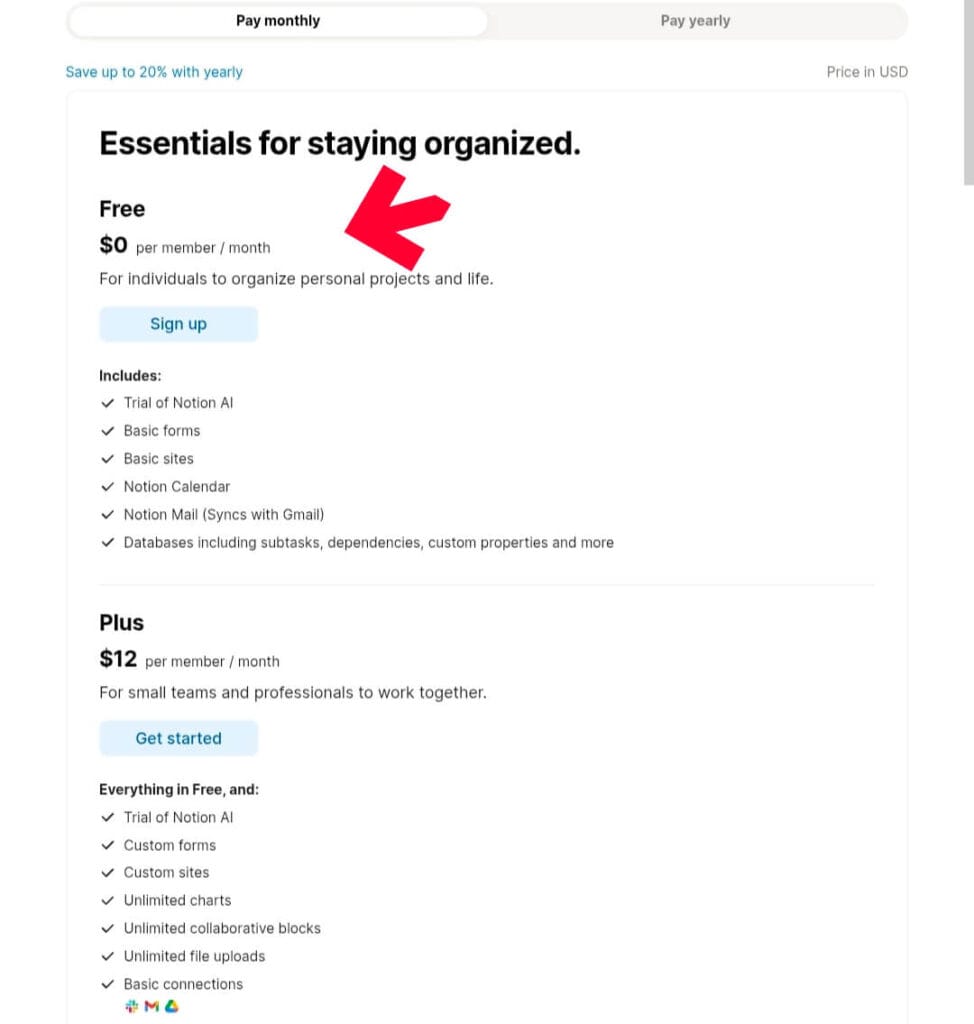
Looking closely at Notion’s monthly pricing breakdown:
| Plan | Price Per Member/Month | Notion AI Access Listed | File Uploads | Page History |
|---|---|---|---|---|
| Free | $0 | Trial of Notion AI Notion AI Core: Limited Trial | Up to 5 MB | 7 days |
| Plus | $12 | Trial of Notion AI Notion AI Core: Limited Trial | Unlimited | 30 days |
| Business | $24 | Checkmark listed for Notion AI Core | Unlimited | 90 days |
Key notes from the pricing page:
- Both Free and Plus plans list “Trial of Notion AI” in the “Includes” section.
- Under “Notion AI”, the “Notion AI Core (chat, generate, autofill, translate)” feature shows “Limited Trial” for Free and Plus plans.
- For current details on what “Limited Trial” includes, refer to your Notion workspace or Notion’s Help Center.
2. How AI Use Is Generally Categorized in US Colleges
AI use policies in US education are set by individual institutions and instructors. Based on publicly available information from education sources, policies generally fall into three categories:
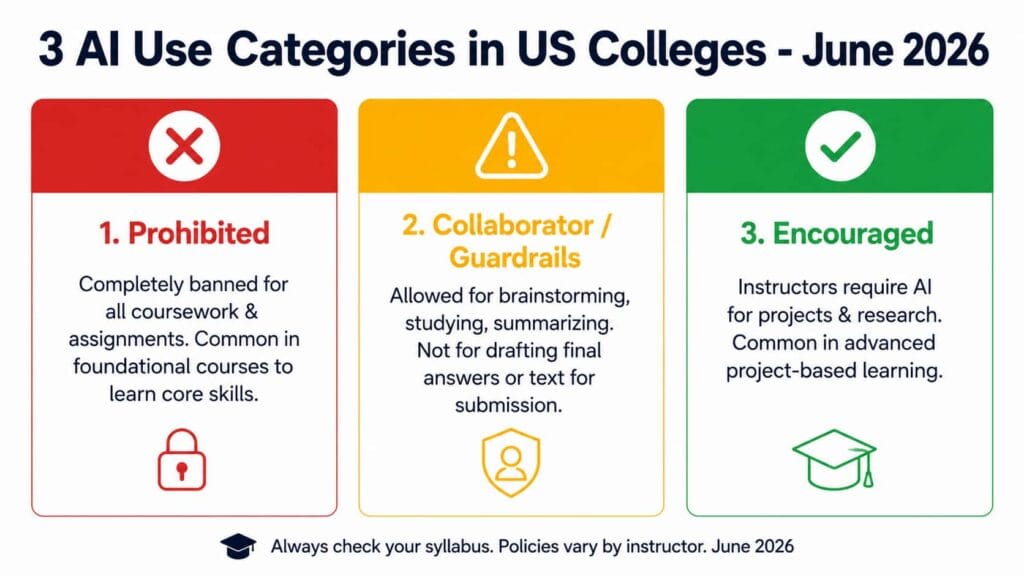
- Prohibited: AI use is completely banned for all coursework and assignments. This is often applied to early-year foundational courses where the goal is to learn core skills.
- Collaborator / Guardrails: AI is permitted for specific tasks like brainstorming, studying, summarizing texts, or checking grammar. Using it to draft actual text or answers for submission is usually not permitted.
- Encouraged: Instructors actively require or teach AI tools for advanced project-based learning and research methodology.
Common best practices reported by students and educators:
- Check the Syllabus: Most courses provide a syllabus outlining the professor’s AI policy. Review this first.
- Cite Your Sources: If you are permitted to use AI for research, you may need to cite the tool using APA or MLA formats.
- Focus on Learning: Use AI to explain complex concepts or create practice quizzes. Submitting AI-written work as your own is considered academic dishonesty at most schools.
- When in Doubt, Ask: If the policy is unclear, email your professor to ask what tools are permitted for the assignment.
3. Student-Useful Notion AI Features Listed by Notion
Based on Notion’s Help Center, these features may help with college coursework:
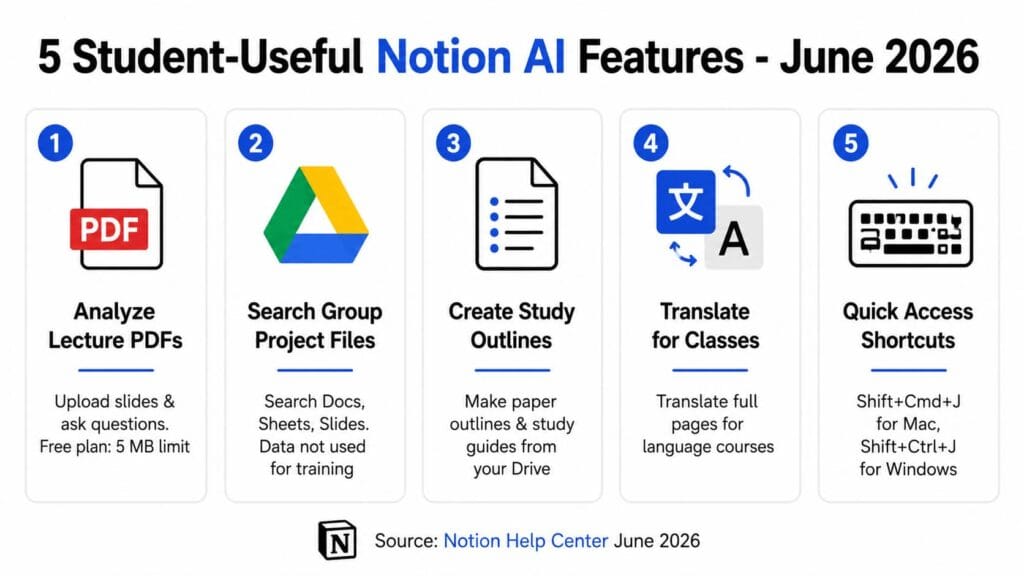
Upload and Analyze PDFs of Lecture Slides
Notion’s official docs confirm that you can actually upload PDFs and images directly to the chat. This means you can upload your professor’s lecture slides or reading PDFs and ask questions about the content.
Plan limit to know: The Free plan supports file uploads up to 5 MB. The Plus plan lists “Unlimited file uploads”.
Search Google Drive for Group Project Files
Notion’s guide states Notion AI can access and search through connected Google Workspace documents including Google Docs, Sheets, and Slides.
Privacy note from Notion: If you’re worried about privacy, Notion makes it clear: ‘We never use your data for AI training.’ Notion AI only shows you information from places you can access.
Create Outlines for Papers and Study Guides
Notion’s Help Center gives an example of writing a history report. It states you can choose Google Drive as your search source and ask Notion AI to make a report outline based on the information it finds on your topic.
Translate Pages for Language Classes
According to the Help Center, you can translate an entire page by clicking the Notion AI icon in the bottom right corner and choosing translate.
Access Notion AI Quickly During Study Sessions
Notion’s guide lists these access methods:
- Click the circular icon with a face in the bottom-right corner of your Notion page.
- Use keyboard shortcuts: Shift + Cmd + J for Mac or Shift + Ctrl + J for Windows. The guide notes the Notion Desktop app must be installed for this shortcut.
- Revisit previous conversations using ‘View History’ in the three-dot menu on the right side of the Notion AI chat interface.
Notion AI works great for homework and organizing class notes. But if you’re looking at other options, I put together a full guide on the 4 best AI tools for homework in 2026. It breaks down pricing, free plans, and which tool works best for different subjects.
4. How to Limit Searches to Your Class Readings
When working on a research paper, Notion’s guide explains you can ask Notion AI to look in specific sources:
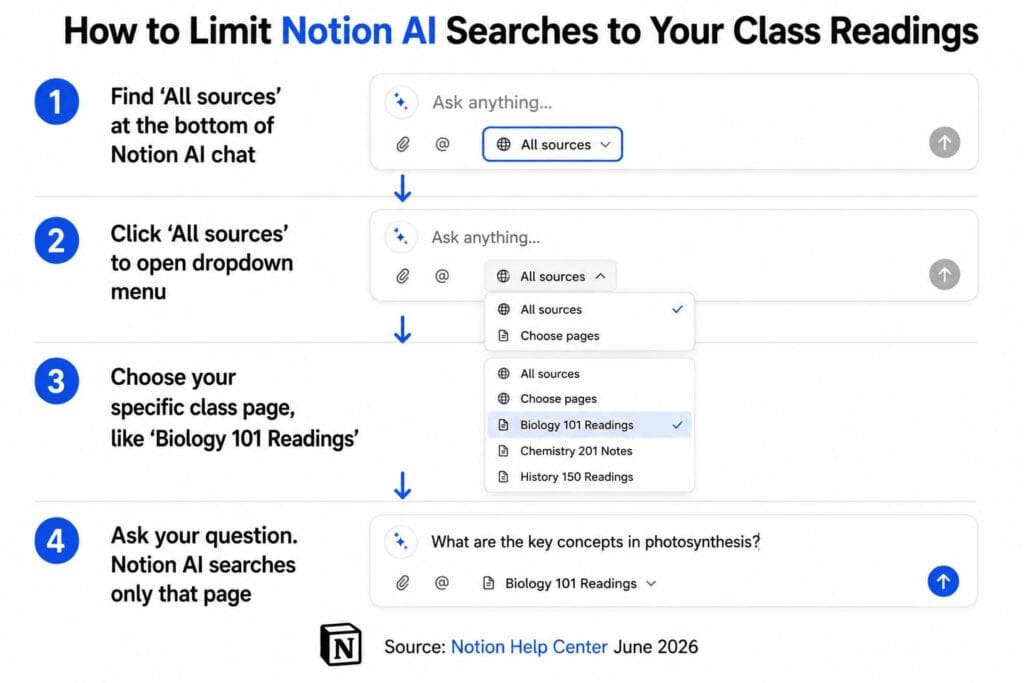
- Look for the All sources option at the bottom of your Notion AI chat box.
- Click on All sources to open a dropdown menu.
- Choose a specific page from the dropdown to narrow your search. For example, select your “Biology 101 Readings” page.
- Ask your specific question. Notion AI will then search only within your selected source.
Notion AI is solid when you need to search your own class notes and PDFs. But for pulling fresh research from the web, tools like Perplexity and ChatGPT are also worth checking out. If you’re not sure which one to use and when, I compared them here: Perplexity Pro vs ChatGPT Plus in 2026.
Frequently Asked Questions Based on Official Sources
1. Is Notion AI free for college students?
According to the Pricing page, the Free plan is $0 per member/month and includes a “Trial of Notion AI”. The page does not list a separate student discount for AI. For current offers, check notion.so/pricing.
2. What is the difference between Free and Plus for Notion AI?
Based on the “Pay monthly” pricing screenshot, both Free at $0 and Plus at $12 per member/month list “Trial of Notion AI” and show “Limited Trial” for Notion AI Core. The Plus plan lists “Unlimited file uploads” and “30 days” of page history, while Free lists “Up to 5 MB” and “7 days”.
3. Can I use Notion AI if my professor bans AI tools?
If your course syllabus states that AI is prohibited for coursework, you should not use it for that class. Policies are set by individual professors. Always follow the official rules for your specific course.
4. What models does Notion AI use?
According to Notion’s Help Center, Notion AI uses cutting-edge language models like GPT-4 and Claude.
5. Does Notion use my class notes to train AI?
Notion’s guide states: “Notion keeps your data safe and sound. We never use it for AI training.”
Conclusion
Based on Notion’s official Pricing page for monthly billing, the Free plan at $0 and the Plus plan at $12 per member/month both include a “Trial of Notion AI” with Notion AI Core listed as “Limited Trial”.
Features listed in Notion’s Help Center that may help U.S. college students include analyzing uploaded PDFs, searching Google Drive, and creating outlines. File upload limits and page history differ by plan.
AI use policies in US colleges vary by school and professor. Common frameworks include Prohibited, Collaborator/Guardrails, and Encouraged. Because policies change from class to class, you should check your syllabus and ask your professor for the official rules for your course.
Disclaimer
Information Sources: Information about Notion pricing and features is based solely on screenshots of Notion’s official Pricing page and Help Center. Information about US college AI policies reflects general practices reported in publicly available education publications. Pricing, features, and school policies are subject to change.
Not Official Advice: This article does not provide academic, legal, or official policy advice. You must check the official Notion website at notion.so and your course syllabus for the most current information.
This content is not sponsored, endorsed, or affiliated with Notion Labs, Inc. “Notion” is a trademark of Notion Labs, Inc. You are responsible for complying with your school’s academic integrity and honor code policies regarding the use of AI tools.

About the Author
Hey, I’m Dharmendra Singh. I started AITool555 in early 2026 to share AI prompts that actually work.
I personally test every Midjourney, ChatGPT, and Leonardo AI prompt I publish. If it doesn’t save me time or give real results, it doesn’t make it onto this site. No fluff, just prompts I use for my own projects.
Questions? Email me: [email protected]